QR code FAQs
Quick answers to common QR questions about cost, formats, tracking, expiration, printing, and scanning.
This page collects the QR questions people ask most often before they create, print, or manage a code in T.LY. If you want the short version first: create a free static QR code when the destination will not change, and use a dynamic QR code when you want to edit, brand, or track it later.
Basics
What is a QR code generator?
A QR code generator turns a URL or other supported content into a scannable image you can share digitally or print on physical materials. In T.LY, you can create QR codes for websites, contact details, WiFi, messages, events, and more.
Are QR codes free?
You can create one-off static QR codes with the free QR Code Generator and related QR tools. If you need edit-after-printing workflows, dashboards, or scan analytics, create an account and use QR Code Management. For the broader product breakdown, see Free vs paid.
Can I use generated QR codes for commercial purposes?
Yes. T.LY QR codes are designed for real-world business use on menus, packaging, signage, ads, business cards, flyers, direct mail, and product inserts.
What kind of information can be stored in a QR code?
T.LY supports many QR code types, including:
- Website URL and managed short links
- vCard contact details
- WiFi credentials
- Email, SMS, and phone actions
- Event and location details
- Plain text
Start with QR code basics if you want a quick overview of when each type makes sense.
Is it possible to count QR code scans?
Yes, but you need a dynamic QR code. Dynamic QR codes point to a managed redirect, which lets T.LY record scan activity and show metrics like totals, unique visitors, locations, devices, and trends over time. See Track QR code scans.
How long are QR codes valid for? Do they expire?
A QR code itself does not have a built-in expiration date. A static QR code keeps working as long as the URL or data inside it still works. A dynamic QR code keeps working as long as the managed short link stays active and still points somewhere valid. If you intentionally add expiration rules to the managed link behind a QR code, that destination can stop resolving on schedule.
What does static and dynamic QR code mean?
Static QR codes store the final data directly in the code, so they cannot be edited later. Dynamic QR codes point to a redirect you control, which means you can update the destination, fix mistakes, and track scans after printing. If you need flexibility, dynamic is usually the better choice.
How do I manage QR codes in T.LY?
Use the free generator for quick one-off codes. When you need dashboards, branded defaults, editing controls, or analytics, move into QR Code Management. That workflow is built around managed links, so your QR destinations are easier to update and measure over time.
Creating & Designing
Is it possible to create different QR codes for the same content?
Yes. You can create multiple QR codes that point to the same destination while changing the design, colors, logo treatment, file format, or placement-specific campaign link. That is useful when you want to A/B test different placements or give each print asset its own trackable code.
Can I customize a QR code with my company logo or icon?
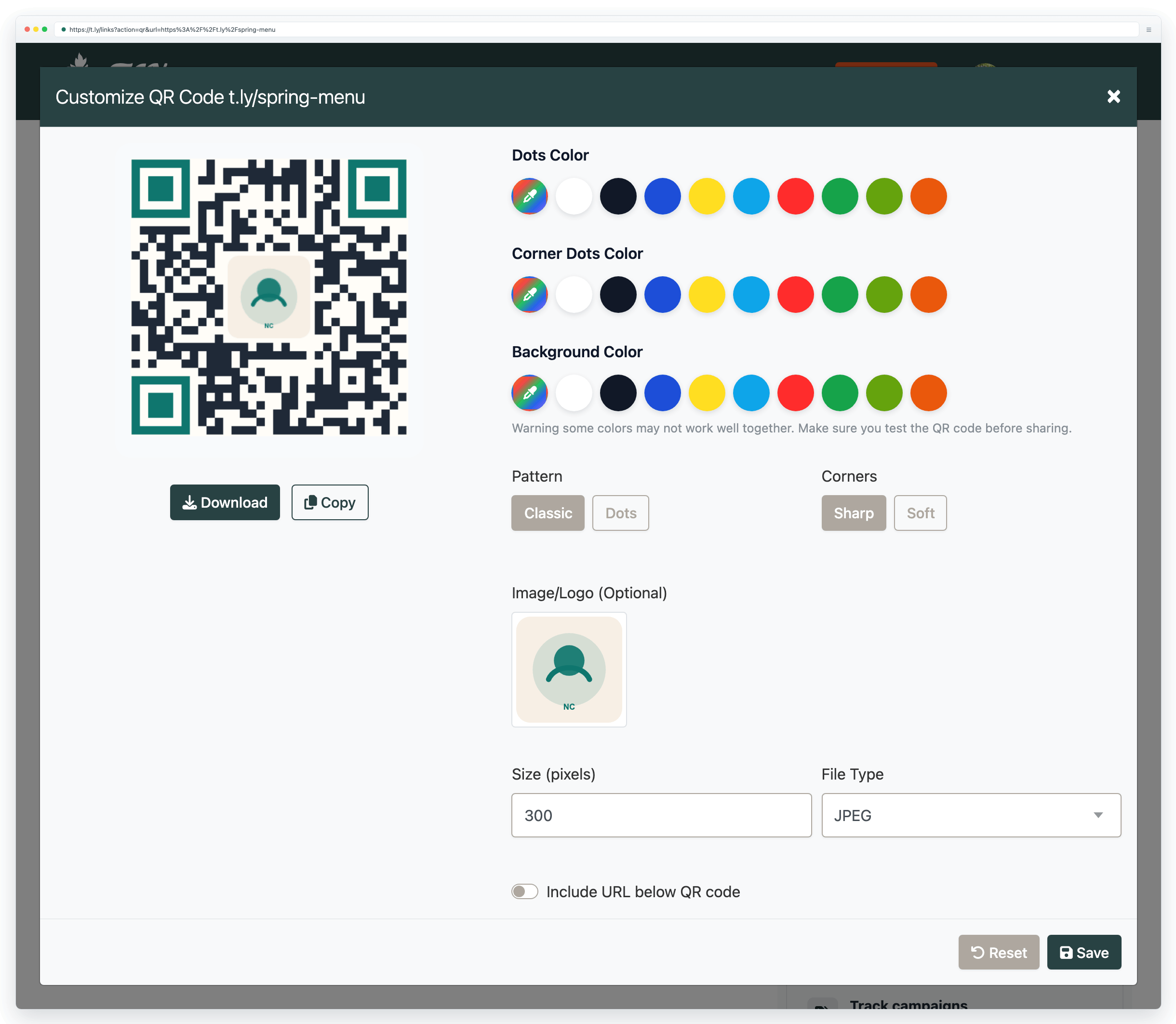
Yes. T.LY lets you add center logos and customize colors, corners, and dots. Keep the logo modest in size, preserve the quiet zone, and test the final code on real phones before you send it to print. For deeper guidance, start with QR code basics.
Do QR codes have to be black and white?
No. You can use brand colors and still keep a QR code scannable, as long as contrast stays strong. Dark foreground colors on a very light background are the safest option. If you want branded designs without guessing, use the live preview in the generator and test before printing.
Can a QR code be edited or changed?
Dynamic QR codes can be updated after printing because they point to a managed redirect. Static QR codes cannot be changed without creating a new image. If you expect the destination to change, start with a short link and dynamic QR workflow instead of embedding the final destination directly.
How do I generate a large batch of QR codes?
For bulk creation, use the Bulk QR Code Generator for spreadsheet-style workflows or the API when you want to generate QR-enabled links programmatically inside your own system.
Scanning & Printing
What graphics formats do the generated QR codes support?
T.LY QR codes can be downloaded in PNG, JPEG, WEBP, and SVG. For most professional print work, SVG is the safest choice because it stays crisp at any size. For more on file choice and print prep, see the QR code printing guide.
What should I know before printing my QR code?
Before printing, make sure you:
- Use a large enough size for the expected scanning distance
- Keep strong contrast between the code and background
- Leave a quiet zone around all edges
- Use SVG or a high-resolution image for print
- Test the real print proof on multiple phones
For size guidance from business cards to billboards, see the printing guide.
How do I read or scan a QR code?
Open your phone camera, point it at the QR code, and wait for the prompt to appear. On many Android devices, Google Lens is also available from the Camera app. If you are scanning an image file instead of a live code, use the QR Code Scanner.
Can QR codes be scanned without an app?
Usually yes. Most current iPhone and Android phones can scan from the built-in camera app. If nothing happens, check your camera settings or try Google Lens on Android.
Is there a scan limit for QR codes?
No. QR codes do not have a built-in scan cap. If the destination stays live and reachable, people can keep scanning the code.
Why is my QR code not working?
The most common causes are that the code is too small, too low-contrast, blurry, cropped too tightly, printed on a glossy surface with glare, or overloaded with too much data. If a code fails, work through the checklist in QR code not scanning.
Can my smartphone scan QR codes?
Most modern iPhones and Android phones can scan QR codes using the default Camera app. Older devices may require a QR scanner app, but that is becoming less common each year.
What is the minimum size of a QR code?
A good starting point is about 2 cm x 2 cm (roughly 0.8 in x 0.8 in) for close-up scanning on small print pieces. Increase the size as scanning distance grows. A simple rule of thumb is the 10:1 rule: for every 10 cm of scanning distance, use about 1 cm of QR code size.
QR Use Cases
If you already know the industry or placement you care about, jump into a T.LY use case:
- QR Codes for Restaurants
- QR Codes for Retail
- QR Codes for Real Estate
- QR Codes for Events
- QR Codes for Hotels
- QR Codes for Business Cards
Need more help?
If you still have questions, contact [email protected] or use the contact form. For abuse or suspicious links, use Report Abuse. For feature requests, email [email protected].
 Browser Extension



