Retargeting pixels
Attach tracking pixels to links for remarketing and campaign measurement.
Retargeting pixels let you fire third-party tracking when someone clicks a short link. In T.LY, that happens on a short-lived redirect page before the visitor is sent to the destination URL. This is useful for remarketing audiences, campaign comparison, and directional attribution across ads, email, QR codes, print, and social.
How T.LY redirect pixels work
- You save reusable pixels in Settings > Pixels.
- You attach one or more saved pixels to a short link when creating, editing, importing, or bulk updating links.
- When someone clicks the short link, T.LY resolves the final destination first, including Smart URL or rotation logic if you use those features.
- T.LY then serves a temporary
noindex, nofollowredirect page, injects each supported platform snippet attached to the link, waits briefly, and redirects the visitor to the destination URL. - Incoming query parameters are preserved and forwarded to the destination URL, so your UTM parameters can continue downstream.
A few implementation details matter. T.LY only shows the redirect page for normal visitors. Crawlers and preview bots skip it, so social preview scrapers, link scanners, and some automated tools usually will not fire redirect pixels. JavaScript-disabled browsers fall back to a meta refresh redirect, but some platforms may record less data in that path.
What T.LY fires vs. what it does not
- T.LY does fire page-load style tracking on the redirect page: for example
PageView,pageLoad,page(), or the platform's base tag initialization. - T.LY does not replace full destination-site tracking: it does not know when someone actually purchases, submits a lead form, starts a trial, or completes checkout on your site unless your site also has those platform tags or server-side integrations installed.
- T.LY is best for audience seeding and directional attribution: think "this person clicked a campaign link" rather than "this person completed my final conversion."
- URL rules inside ad platforms usually need to match the short link, not the destination page: the pixel fires on the redirect page URL before the user lands on the final site.
Where to manage pixels
- Open Settings > Pixels.
- Add the platform and identifier you want to reuse.
- Attach the saved pixel to any short link, bulk import, or bulk update that should fire it.
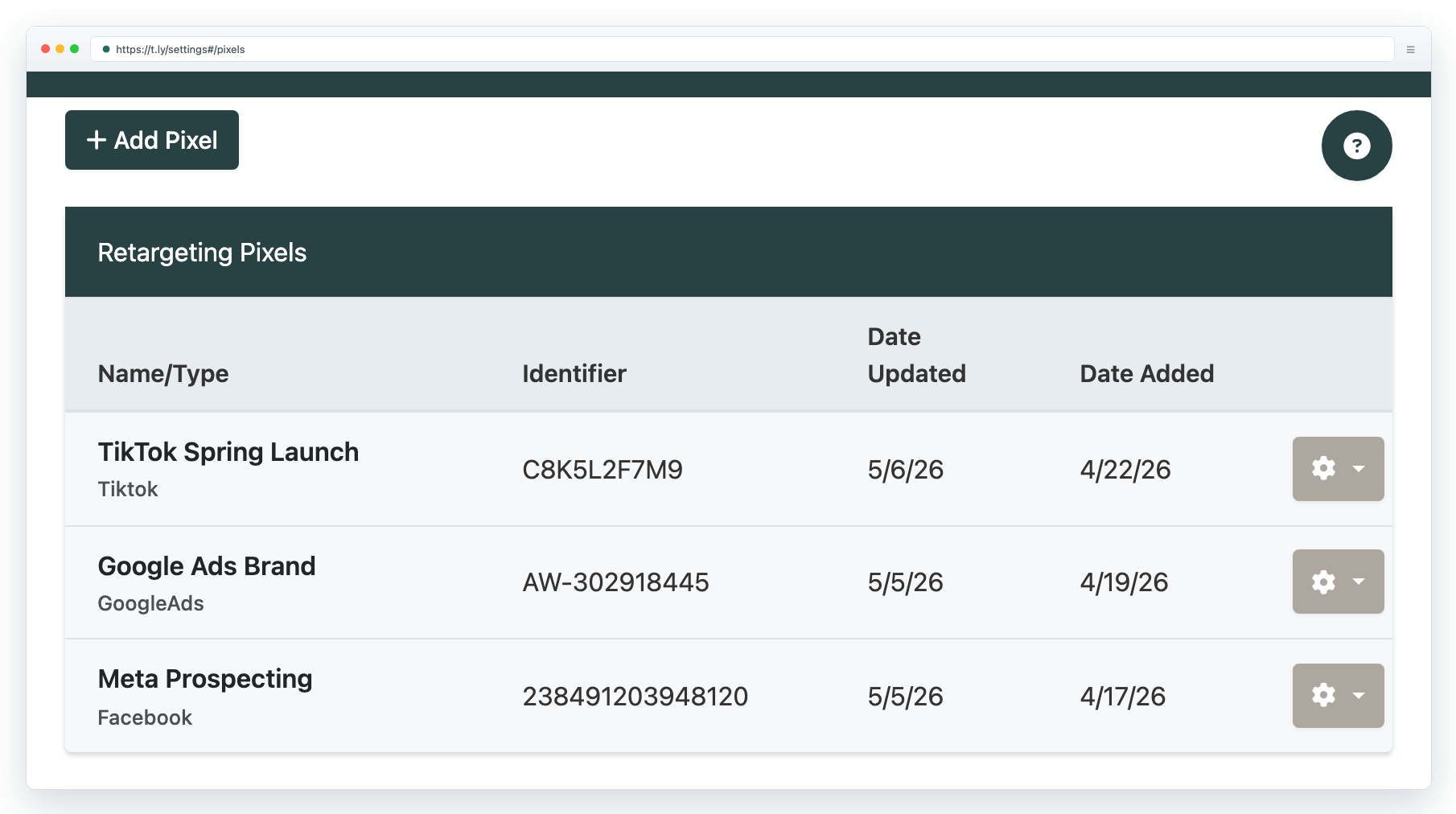
Supported platforms
T.LY currently supports Meta (Facebook), Google Ads, Google Tag Manager, Google Analytics, X (Twitter), Microsoft Advertising (Bing UET), Quora, TikTok, Pinterest, Snapchat, and LinkedIn.
Meta Pixel
- What T.LY fires: Meta Pixel base code plus
PageView. - Best use inside T.LY: remarketing audiences for people who clicked a short link.
- What to enter: your Meta Pixel ID from Events Manager.
- Best practice: keep the T.LY redirect pixel for click audiences, but still run Meta Pixel and, ideally, Conversions API on the destination site for purchases, leads, subscriptions, and stronger matching.
- Important note: if you create URL-based website audiences or custom conversions in Meta, use the short-link URL or path pattern that actually loads during the redirect.
- Good fit: paid social, influencer links, creator links, or QR campaigns where you want to re-engage clickers later in Meta.
Google Ads
- What T.LY fires: the current Google tag (
gtag.js) configured with yourAW-tag ID on the redirect page. - Best use inside T.LY: basic audience building from short-link clicks.
- What to enter: the Google Ads tag ID shown in your setup, usually an
AW-ID. A connected Google tag may instead use aGT-ID. T.LY also keeps older numeric Google Ads IDs working. - Best practice: Google documents that the Google Ads tag uses the Google tag plus an event snippet. T.LY does not inject your destination site's purchase or lead event snippets, so keep Google Ads tagging on the final site if you optimize toward real conversions.
- Important note: if you need URL-based conversion actions, set them up against the short-link URL pattern that fires in T.LY, or handle conversion measurement on the destination site instead.
- Good fit: seeding Google Ads remarketing audiences from campaign links shared across email, creators, podcasts, bios, or print.
Google Tag Manager
- What T.LY fires: your GTM container snippet on the redirect page.
- Best use inside T.LY: centralizing multiple redirect-page tags in one GTM container.
- What to enter: your GTM container ID, usually in the format
GTM-XXXXXXX. - Best practice: keep the container lean and fast. T.LY's redirect page only lives briefly, so tags that depend on slow loads or complex triggers can miss the window.
- Best practice: configure redirect-page tags to fire on all pages or on clear short-link path rules, then validate them with GTM Preview and Tag Assistant.
- Important note: GTM on T.LY helps with redirect-page logic. It does not automatically give you the destination-site data layer, ecommerce data, or checkout events from your own website.
Google Analytics
- What T.LY fires:
gtag.jswith your GA measurement ID and a redirect-page configuration call. - Best use inside T.LY: directional measurement of short-link click landings.
- What to enter: your GA4 measurement ID, usually in the format
G-XXXXXXXXXX. - Best practice: treat this as redirect-page analytics, not a replacement for full GA on your website. Keep GA installed on the destination site for engagement, ecommerce, cross-domain flows, and final conversion reporting.
- Best practice: if your destination site already has GA4, watch for duplicate or confusing reporting. In many setups, GA in T.LY is most useful when you want a separate "short-link click reached redirect page" signal.
- Good fit: campaign diagnostics, redirect-page testing, and directional measurement where you want one more signal beyond T.LY click analytics.
X Pixel (Twitter)
- What T.LY fires: the current X base pixel plus
twq('config', ...), which creates the platform's site-visit signals. - Best use inside T.LY: Website Activity Audiences built from people who clicked a short link.
- What to enter: your X pixel ID from Events Manager.
- Best practice: X recommends using the website tag for website activity audiences and validating with the X Pixel Helper.
- Best practice: when you build URL rules inside X, prefer URL Contains over Exact URL. This is especially important for T.LY because protocols and query strings can vary.
- Important note: if you need purchase, lead, or other lower-funnel X events, implement those on the destination site too. T.LY only gives you the redirect-page visit layer.
Microsoft Advertising (Bing UET)
- What T.LY fires: Microsoft UET initialization plus
pageLoad. - Best use inside T.LY: remarketing lists and directional Microsoft Ads website activity measurement.
- What to enter: your UET Tag ID from Microsoft Advertising.
- Best practice: Microsoft states that a UET tag across your website powers conversion goals and remarketing lists. Use the T.LY redirect signal for click audiences, but keep UET on the destination site if you rely on conversion goals, automated bidding, or post-click performance analysis.
- Best practice: if your consent setup applies to Microsoft tags, make sure your implementation approach supports those requirements before using redirect-page tracking in production.
- Good fit: seeding Microsoft remarketing pools from shortened campaign links.
Quora Pixel
- What T.LY fires: the Quora Base Pixel plus its page-view event,
ViewContent. T.LY does not mark every click as aGenericconversion. - Best use inside T.LY: audience creation and directional attribution from link clicks.
- What to enter: your Quora Pixel ID from Ads Manager.
- Best practice: Quora separates the Base Pixel from Event Pixels and Custom Events in its setup guidance. T.LY is best used as the redirect-page signal, while your destination site should still handle the actual lead, purchase, or confirmation events if Quora optimization depends on them.
- Best practice: verify status in the Pixels & Events area and make sure every domain involved in your conversion flow is covered if your forms or checkouts live elsewhere.
- Important note: Quora also supports Advanced Match, but T.LY does not inject your destination site's hashed email or deeper conversion logic for you.
TikTok Pixel
- What T.LY fires: TikTok Pixel base code plus
ttq.page(). - Best use inside T.LY: top-of-funnel audience seeding and remarketing from short-link visitors.
- What to enter: your TikTok Pixel ID from Events Manager.
- Best practice: TikTok recommends pairing Pixel with Events API for more reliable measurement. T.LY does not send server-side events, advanced matching payloads, or checkout events on your behalf.
- Best practice: validate with TikTok Pixel Helper and remember TikTok notes that activation can take up to 24 hours to show as active after real events occur.
- Important note: if your campaign optimizes to
Lead,Purchase, or another lower-funnel event, keep full TikTok event tracking on the destination site.
Pinterest Tag
- What T.LY fires: Pinterest base tag plus
pintrk('page'). - Best use inside T.LY: audience building from people who clicked a short link.
- What to enter: your Pinterest Tag ID from Conversions.
- Best practice: Pinterest documents that the base code should fire before event code. That lines up well with T.LY for redirect-page traffic, but catalog retargeting, checkout measurement, enhanced match, and product-specific parameters still belong on the destination site or in your own GTM setup.
- Best practice: if you need richer resilience, Pinterest also recommends the Conversions API together with the Pinterest tag.
- Important note: Pinterest's GTM guidance calls out optional enhanced match and product_id mapping. T.LY does not provide those values by itself on redirect pages.
Snap Pixel
- What T.LY fires: Snap Pixel plus
PAGE_VIEW. - Best use inside T.LY: traffic-based audiences and directional Snapchat campaign measurement.
- What to enter: your Snap Pixel ID from Events Manager.
- Best practice: Snapchat recommends using the pixel together with Conversions API because CAPI can recover events that browser-only tracking misses.
- Best practice: use Snap Pixel Helper and the Test Events tool to verify that the redirect page is actually firing. If your destination-site setup drives optimization, also watch Event Quality Score inside Snapchat Events Manager.
- Important note: T.LY does not pass your site's deeper checkout, signup, or first-party identity signals automatically. Keep full Snap measurement on your site for lower-funnel optimization.
LinkedIn Insight Tag
- What T.LY fires: LinkedIn Insight Tag JavaScript plus the noscript image fallback.
- Best use inside T.LY: matched audiences and website-visit measurement from short-link clicks.
- What to enter: your LinkedIn Partner ID from Campaign Manager.
- Best practice: LinkedIn recommends the JavaScript-based Insight Tag over image-only tracking, and it supports enhanced conversion tracking for stronger matching. T.LY gives you the page-load tag layer, but not your destination site's richer event or identity data.
- Best practice: if you run separate mobile and desktop sites, LinkedIn recommends tagging both. In a T.LY workflow, that usually means keeping the redirect-page tag in T.LY and the full destination-site tag on each real site you control.
- Important note: LinkedIn notes that tag activation can take up to 24 hours depending on traffic, so do not assume a new setup is broken immediately after launch.
When to use redirect pixels
- Paid campaigns where remarketing is part of the plan
- Cross-channel launches where one short link is used in email, QR, creator posts, bios, print, podcasts, or display
- Campaigns where you want a second measurement layer in addition to destination-site analytics
- Situations where the short link itself is the audience-building moment you care about
When to use destination-site tracking instead
- Checkout, purchase, lead, subscription, or demo-booked optimization
- Enhanced conversions, advanced matching, hashed email matching, or server-side API setups
- Catalog or product retargeting that needs product IDs, order IDs, or value parameters
- Strict consent and CMP workflows where tags must be gated based on user consent before marketing scripts run
Troubleshooting checklist
- Test one pixel first: attach a single pixel to a test link before stacking multiple platforms on one redirect.
- Pause the redirect for inspection: append
?debug=trueto a pixel-enabled short URL to keep the redirect page open while you inspect network requests and helper tools. - Use each platform's verifier: Tag Assistant, X Pixel Helper, TikTok Pixel Helper, Pinterest Tag Helper, Snap Pixel Helper, LinkedIn network inspection, or the platform event manager.
- Disable blockers while testing: ad blockers, privacy extensions, VPN browsers, and some mobile privacy settings can suppress platform scripts.
- Check the right URL: if you build audiences or URL-based rules in the ad platform, make sure they reference the short-link page that actually fired the pixel.
- Expect lag: several platforms can take minutes or even up to 24 hours before a new pixel or event source shows as active.
Important limitations
- Ad blockers and privacy-focused browsers can stop scripts from loading.
- Crawlers and preview bots typically do not fire T.LY redirect pixels because the intermediate redirect page is skipped for them.
- Mobile privacy changes, browser restrictions, and third-party cookie limits reduce match rates across every ad platform.
- Pixel counts are usually directional, not exact. Treat them as one signal alongside click analytics, destination-site analytics, and actual conversion reporting.
- Third-party tags can receive the redirect-page URL, query string, referrer, IP address, and browser details. Do not put personal, financial, health, or other sensitive data in pixel-enabled short URLs or forwarded query parameters.
- T.LY fires attached pixels before the destination page loads, so a consent banner on the destination site cannot gate these redirect-page tags. If your legal setup requires consent before marketing tags run, only use redirect pixels where your own consent flow or other lawful basis already covers them.
Best practices
- Combine redirect pixels with T.LY click analytics so you keep a more reliable baseline even when third-party scripts are blocked.
- Use tags to group pixel-enabled links by campaign, client, platform, or reporting window.
- Use UTM presets whenever you also want attribution inside GA4, Adobe, HubSpot, or another analytics stack.
- Name saved pixels clearly, such as
Meta - Brand US - Main AccountorTikTok - Spring Launch - Agency, so teammates attach the correct account every time. - Keep one source of truth for final conversions. In most teams, T.LY redirect pixels are for audience building and directional measurement, while the destination site or server-side setup owns the true conversion event.
Need more help?
If you still have questions, contact [email protected] or use the contact form. For abuse or suspicious links, use Report Abuse. For feature requests, email [email protected].
 Browser Extension



