
How to Automate Social Media Posts With AI and Track Every Link
An AI agent can turn one guide, video, product update, or customer story into a week of social posts. The part that usually gets messy comes next: creating tracking links, moving the copy into a scheduler, publishing it, and figuring out which posts sent real traffic.
You can automate most of that work without giving up control.
A practical setup looks like this:
- Give your AI agent a source article, campaign brief, or list of ideas.
- Ask it to draft a version for each social network.
- Have it add UTMs and create a unique T.LY short link for every destination.
- Send the finished posts to Buffer, Pallyy, or another scheduling tool.
- Review the queue, publish, and track clicks in T.LY.
The scheduler tells you what happened on the social network. T.LY tells you what happened after someone clicked.
Start with the level of automation you trust
You do not need to hand an agent the keys to every social account on day one. There are three reasonable ways to set this up.
Draft only
The agent writes platform-specific posts and creates the short links. A person reviews the copy and pastes approved posts into the scheduler.
This is the best place to start. You remove the repetitive work while keeping a clear approval step.
Draft and schedule
The agent writes the posts, creates the links, and adds drafts or scheduled posts to your social media calendar. A person reviews the queue before anything goes live.
Buffer is particularly useful for this setup because it offers an API and an MCP server for AI agents. Your agent can work with the publishing queue instead of signing in to every network separately.
Publish automatically
The agent creates and publishes posts without a person approving each one. This can work for predictable content such as new blog post announcements, release notes, event reminders, or a recurring weekly roundup.
You can publish through a scheduler or connect to official network APIs. LinkedIn, TikTok, X, and Bluesky all provide ways to create posts through an API. Access rules, approval requirements, supported post types, and rate limits vary. Maintaining every connection yourself is real engineering work.
For most teams, a scheduler is the simpler route. It keeps authentication, calendars, retries, and platform changes in one place.
Social media scheduling tools worth looking at
There is no single best scheduler. Pick the one that fits how your team reviews and publishes content.
| Tool | Good fit when you need |
|---|---|
| Buffer | A clean queue, platform-specific post variations, built-in AI help, and API or MCP access for agent workflows |
| Pallyy | A visual calendar, client approvals, analytics, an inbox, and automatic publishing across major networks |
| Later | A visual-first workflow for Instagram, TikTok, Pinterest, and other media-heavy channels |
| Metricool | Scheduling, best-time suggestions, reporting, and an AI writing assistant in one tool |
| Hootsuite | Larger teams that need bulk scheduling, approvals, social listening, and deeper collaboration |
If you already use one of these, keep it. The T.LY part of this workflow does not depend on a particular scheduler.
Give every social post its own short link
Reusing one short link across an entire campaign is easy, but it hides useful information.
Imagine you share the same guide on LinkedIn, X, Facebook, and Threads. The guide gets 400 clicks. That is nice, but it does not tell you which post worked. Referrer data can help, but it is not always complete. Apps, privacy controls, and copied links can remove or change it.
A unique short link for each post gives you a cleaner answer.
For example:
| Post | Destination tracking | T.LY description |
|---|---|---|
| LinkedIn post 1 | utm_source=linkedin&utm_medium=social&utm_campaign=agent_guide&utm_content=post_01 |
`Agent guide |
| X post 1 | utm_source=x&utm_medium=social&utm_campaign=agent_guide&utm_content=post_01 |
`Agent guide |
| Threads post 2 | utm_source=threads&utm_medium=social&utm_campaign=agent_guide&utm_content=post_02 |
`Agent guide |
The agent adds those parameters to the destination URL, creates the T.LY link, and puts the returned short_url into the social post. The long tracking URL stays out of the copy.
If one link per post would create more detail than you need, use one per platform and campaign. The point is to choose a tracking level before publishing, not to make your reports noisy.
Read How to Add UTM Parameters to T.LY ShortLinks for a fuller UTM setup. The campaign tracking guide also covers naming links by channel and placement.
Create a T.LY API token for your agent
Your agent needs a T.LY API token before it can create short links on your behalf.
- Create a T.LY account or sign in.
- Open Settings > API.
- Enter a clear token name such as
Social Content Agent. - Click Create.
- Copy the token when it appears. T.LY only displays the full value once.
- Store it in your agent platform's secret manager or as an environment variable named
TLY_API_TOKEN.
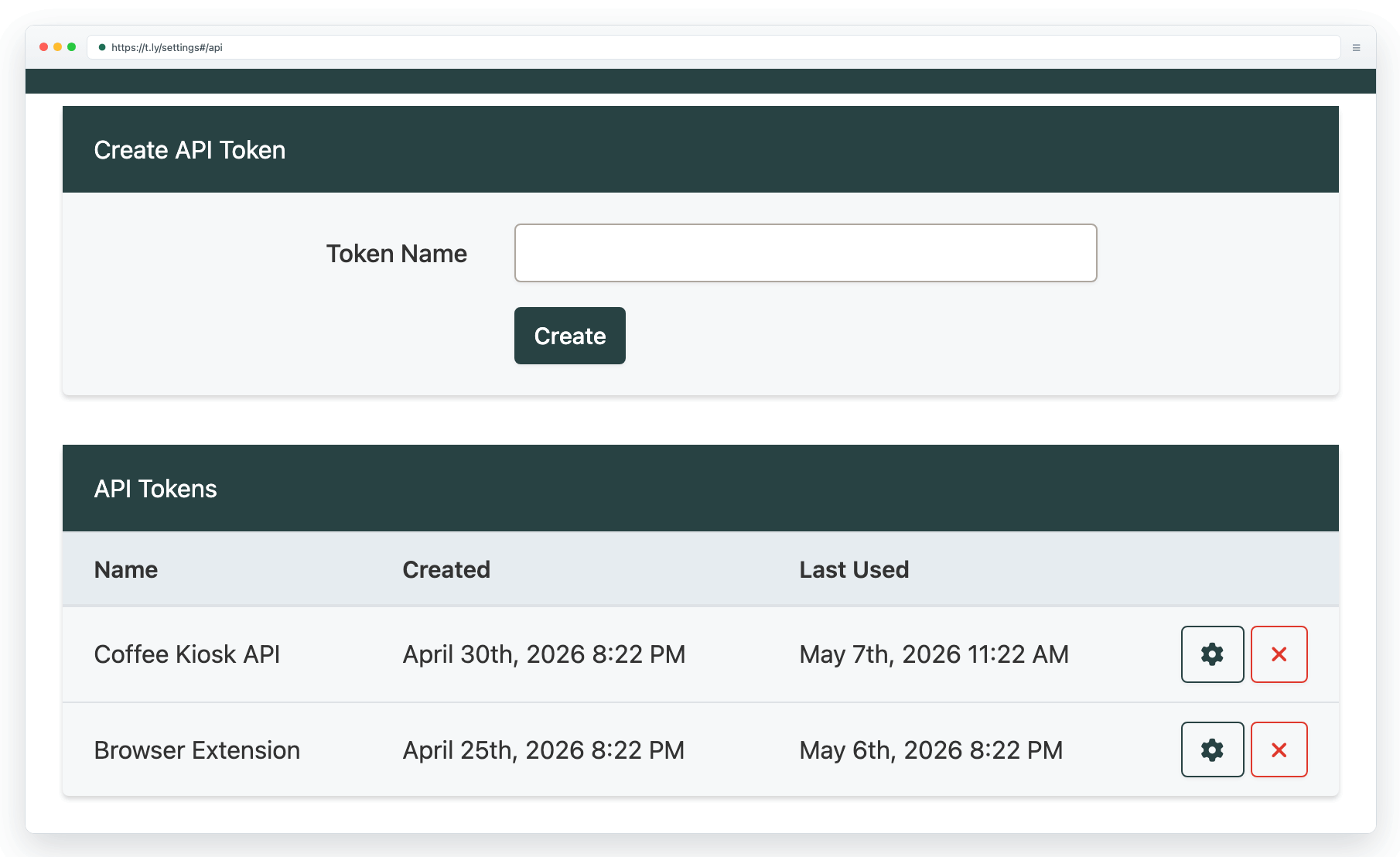
Treat the token like a password. Do not paste it into the agent's permanent instructions, a public chat, a spreadsheet, or source code. Give the agent access through a secret field or environment variable. If the token is exposed, revoke it in API settings and create a new one.
The API basics and SDKs guide covers the supported packages and setup options. Developers can use the full T.LY API documentation. For no-code ideas, see Automation starters.
Tell the agent exactly what to do with links
Vague instructions create vague tracking. Add a short link policy to the agent's task.
Here is a prompt you can adapt:
Create social posts from the approved source material.

For every post that sends people to a website:
1. Keep the claim and destination faithful to the source.
2. Write a separate version for each selected social network.
3. Add lowercase UTM parameters to the destination URL:
   - utm_source = the social network
   - utm_medium = social
   - utm_campaign = the campaign name I provide
   - utm_content = a unique post ID
4. Use the T.LY API and the TLY_API_TOKEN secret to create a new short link.
5. Set the T.LY description to: campaign | network | post ID.
6. Replace the long destination in the post with the returned short_url.
7. If link creation fails, stop and report the error. Never publish the long URL as a fallback.
8. Return a table with the network, scheduled time, final copy, destination URL, and T.LY short link.

Do not publish anything until I approve the final table.
That last line is worth keeping while you test the workflow. Later, you can change it to “add approved posts to Buffer as drafts” or allow automatic publishing for a narrow set of content.
What the agent does through the T.LY API
The main API action is straightforward. For each tracked destination, the agent sends the long URL and a useful description to the create-short-link endpoint.
curl -X POST "https://api.t.ly/api/v1/link/shorten" \
  -H "Authorization: Bearer $TLY_API_TOKEN" \
  -H "Content-Type: application/json" \
  -d '{
    "long_url": "https://example.com/guide?utm_source=linkedin&utm_medium=social&utm_campaign=agent_guide&utm_content=post_01",
    "description": "Agent guide | LinkedIn | Post 01"
  }'
T.LY returns the new short_url. The agent uses that value in the post and keeps a record beside the campaign, channel, and scheduled time.
You can also use an official T.LY SDK instead of calling the endpoint directly.
Connect the finished posts to your scheduler
Once the copy and short links are ready, the next step depends on your tool.
With Buffer, an agent can use Buffer's API or MCP integration to create drafts, schedule approved posts, and manage the queue. With Pallyy, Later, Metricool, or Hootsuite, you can use the scheduler's supported integrations, automation platform, CSV workflow, or a human review step.
Keep one source-of-truth record for each post:
- Campaign name
- Social network and account
- Scheduled time and time zone
- Final post copy
- Destination URL with UTMs
- T.LY short link
- Approval status
- Published post URL
That record makes retries and reporting much easier. It also stops an agent from shortening the same destination again every time a workflow reruns.
Measure clicks in T.LY, not just likes
Social dashboards are good at showing reach, views, comments, shares, and saves. Those numbers describe activity inside the network.
T.LY shows what happened at the link. Depending on your reporting setup, you can review visits, unique visitors, referrers, devices, locations, and click timing. Open the Analytics and Link Tracker guide if you are new to the reports.
UTMs add the next layer. Your website analytics can connect a visit to a campaign and show whether it became a signup, trial, purchase, download, or another conversion.
Together, those tools answer three different questions:
- Scheduler: Did people see or engage with the post?
- T.LY: Did they click the link?
- Website analytics: Did the visit lead to the result you wanted?
That is much more useful than asking an AI agent to publish more content and hoping the extra volume works.
Put guardrails around automatic posting
An agent that can publish should have a small, boring set of rules.
- Only post to an approved list of accounts.
- Set a daily posting limit for each network.
- Require human approval for promotions, pricing, legal claims, breaking news, and sensitive topics.
- Stop when a source cannot be verified.
- Stop when T.LY link creation fails.
- Never expose T.LY, scheduler, or social-network tokens in output or logs.
- Save the final copy, short link, scheduled time, and publishing result.
- Make it easy to pause the queue and revoke credentials.
Start with drafts. Watch how the agent handles links, tone, duplicate posts, and failures. Automatic publishing should be something the workflow earns.
A simple first workflow
Pick one new article from your site and ask your agent for three posts: LinkedIn, X, and Threads. Have it create three tracked T.LY links, return the review table, and add the approved versions to your scheduler as drafts.
After the posts run, compare social engagement with T.LY clicks. Keep the format that brings the right traffic. Drop the one that only creates noise.
That is the useful version of AI social media automation. The agent does the repetitive work. Your scheduler keeps publishing organized. T.LY shows whether anyone cared enough to click.




Tim Leland
Useful Tools
Ready to improve how you manage links?
T.LY URL Shortener makes long links look cleaner and easier to share! Add your own Custom Domains to personalize your brand. Create Smart Links to customize a URL's destination. Generate QR codes to promote your business.
Start your 5-day trial Browser Extension



