
Best URL Shorteners: 5 Services Compared
The best URL shortener depends on what happens after you create the link. A free tool is fine for a quick, low-risk share. A link used in ads, email, print, or a QR code needs more: a domain you control, an editable destination, reliable redirects, and analytics you can use.
I compared five popular services on those jobs. The short answer:
- T.LY is the best all-around option for marketers, creators, and growing teams.
- Bitly is the familiar choice for larger companies that want an established enterprise platform.
- Rebrandly is a strong fit for organizations built around branded domains and workspaces.
- Short.io stands out when routing rules and automation matter most.
- TinyURL still works well for simple, occasional links.
T.LY publishes this comparison, so there is an obvious bias. The tradeoffs below are specific enough for you to check. Product and plan pages were reviewed on August 10, 2026; limits can change.
URL shorteners compared
| Service | Best for | Free option | Main strength |
|---|---|---|---|
| T.LY | Marketers, creators, and small teams | Quick links without an account | Strong balance of short links, custom domains, analytics, QR codes, and price |
| Bitly | Larger marketing and enterprise teams | Yes, with tight monthly limits | Brand recognition and a broad enterprise platform |
| Rebrandly | Brand-heavy teams and agencies | Yes | Custom domains, workspaces, and branded-link controls |
| Short.io | Technical teams with routing needs | Yes | Geo targeting, mobile routing, automation, and API workflows |
| TinyURL | Occasional personal use | Yes | A simple way to make a basic short link |
What makes a URL shortener good?
Short is only the first requirement. Before you put an important link into the world, check these five things:
- Ownership: Can you use your own domain and keep control of the link?
- Destination changes: Can you fix or replace the target without changing the published short URL?
- Measurement: Do the analytics show useful referrer, device, location, and QR data?
- Workflow: Can your team organize links, use an API, and create links without extra busywork?
- Limits: Are link creation, tracked clicks, data history, and domains included on the plan you can actually afford?
That last point catches people. A feature on a pricing page may only exist on a much higher tier.
1. T.LY: best URL shortener for most marketers and small teams
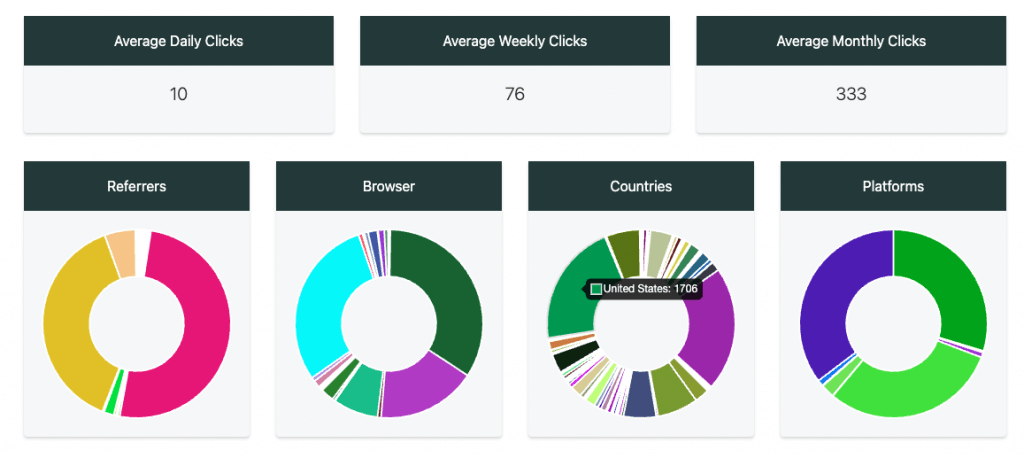
T.LY keeps the free shortener simple, then adds the controls needed for real campaigns. Paid plans include custom domains with SSL, unlimited clicks, private stats, QR codes, and API access. You can update a destination after sharing the link, review city-level analytics, and manage links from the web, browser extensions, or the T.LY mobile apps.
Best fit: You run campaigns across email, social, SMS, ads, print, or QR codes and want the links and analytics in one place.
What stands out:
- Custom branded domains and readable back-halves
- Editable destinations and Smart URL routing
- Click and QR analytics without click limits
- Browser extensions plus iPhone, iPad, and Android apps
- API, webhooks, bulk tools, tags, and team workflows
What to check: Very large organizations with strict SSO, procurement, or permission requirements should compare their exact enterprise checklist across vendors before choosing.
See T.LY pricing or explore the custom URL shortener.
2. Bitly: best-known enterprise option
Bitly is the name most people recognize. Its platform combines short links, QR codes, landing pages, analytics, integrations, and enterprise administration.
The main tradeoff is plan gating. Bitly's free tier is useful for testing, but custom domains, deeper analytics, bulk creation, and advanced campaign features sit on paid tiers. Check the current limits carefully if you create links every day or need long data history.
Best fit: A larger organization values vendor recognition, formal enterprise controls, and a broad marketing platform.
What stands out:
- A mature link, QR code, and landing-page ecosystem
- Enterprise permissions, SSO, onboarding, and SLA options
- Integrations and high-volume API access on larger plans
What to check: Monthly link limits, analytics history, custom-domain access, and the tier required for device or city data.
For a closer look, read T.LY vs. Bitly.
3. Rebrandly: best for branded-domain workflows
Rebrandly puts branded links at the center of the product. Its workspaces can separate links, domains, teammates, and clients, which makes sense for agencies or companies managing several brands.
Best fit: Your team treats branded domains as a core part of campaign governance and needs separate workspaces.
What stands out:
- Custom domains and branded back-halves
- Workspaces for departments, clients, or brands
- Team controls, webhooks, and higher-volume API plans
What to check: Destination-edit allowances, teammates, workspaces, analytics volume, and which advanced security features require a higher plan.
For more detail, read T.LY vs. Rebrandly.
4. Short.io: best for routing and technical workflows
Short.io is worth a look when the redirect itself needs logic. Its paid plans add country targeting, password protection, expiration, link cloaking, city or region targeting, mobile deep links, and larger automation limits.
Best fit: A technical marketing or product team needs geo rules, mobile routing, an API, or a large number of custom domains.
What stands out:
- Country, city, region, device, and mobile routing options
- Automation and API-focused workflows
- Team and enterprise plans with deeper security and data controls
What to check: The exact plan required for each routing rule, tracked-click allowance, and team feature.
5. TinyURL: best for basic one-off links
TinyURL is still one of the quickest ways to shorten a URL. Its free plan covers basic use, while paid plans add link editing, analytics, management tools, and branded domains.
Best fit: You need an occasional short link and do not need a full campaign workflow.
What stands out:
- Familiar, simple link creation
- Free links for light use
- Paid options for custom domains, editing, and analytics
What to check: The length of the finished URL, free-plan management limits, tracked-click allowances, and whether you need a branded domain.
If you are deciding between the two older names, see TinyURL vs. Bitly. You can also read T.LY vs. TinyURL.
What is the best free URL shortener?
For a disposable link, the best free URL shortener is the one that gets out of your way. T.LY lets you create a quick short link from the homepage without an account. TinyURL, Bitly, Rebrandly, and Short.io also offer free entry points, but their creation, analytics, editing, and domain limits differ.
Do not choose an important campaign link on the word “free” alone. Ask what happens if the destination changes, the link gets popular, or you need data three months later. Replacing a link across old emails, printed cards, and QR codes costs more than paying for the right tool upfront.
Which URL shortener should you choose?
- Choose T.LY for a practical mix of branded links, editable destinations, analytics, QR codes, mobile access, and API tools.
- Choose Bitly when enterprise familiarity and a large marketing platform matter more than self-serve value.
- Choose Rebrandly when domains, workspaces, and brand governance drive the decision.
- Choose Short.io when redirect rules and technical routing are the main job.
- Choose TinyURL when you only need a basic link once in a while.
My pick for most people is T.LY because it stays easy at the start and does not force you into a different tool when links become part of a real campaign. Create a short link or review the link management features before choosing a plan.
Related Posts




Tim Leland
Useful Tools
Ready to improve how you manage links?
T.LY URL Shortener makes long links look cleaner and easier to share! Add your own Custom Domains to personalize your brand. Create Smart Links to customize a URL's destination. Generate QR codes to promote your business.
Start your 5-day trial Browser Extension



