How to Check if a QR Code Is Safe Before You Open It
QR codes are everywhere because they work. I use them for menus, signs, product pages, Wi-Fi, and plenty of T.LY campaigns.
The catch is simple: you cannot read a QR code by looking at it. The destination stays hidden until a scanner decodes it. Most of the time that is fine. When a code shows up in an unexpected text, package, email, or sticker, I want to see the link before my browser opens it.
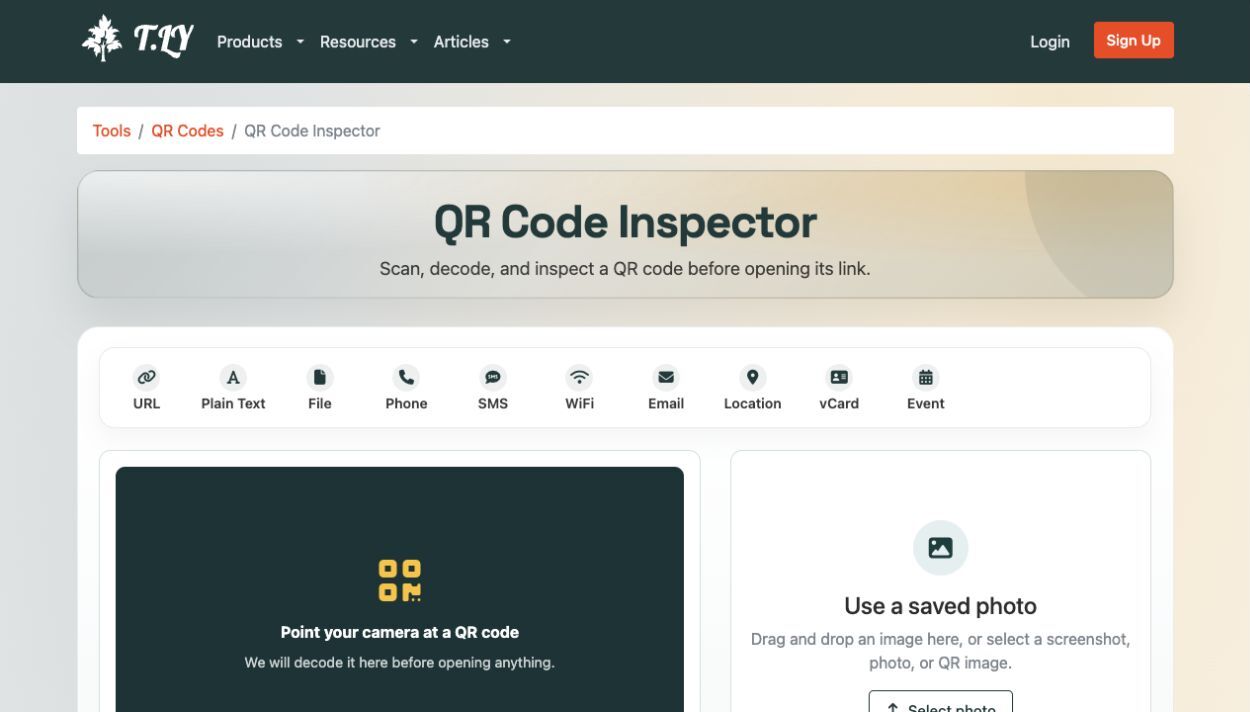
That is why we built the free QR Code Inspector. Use your camera or select a saved photo or screenshot. The tool decodes the image in your browser, shows what is inside, and checks web links without opening the destination on your device.
This matters because scammers use QR codes too. The Federal Trade Commission has warned about harmful links hidden in codes sent by email or text and included in unexpected packages. The U.S. Postal Inspection Service calls QR-based phishing quishing.
When QR codes are used for phishing
Quishing is phishing that starts with a QR code. The code itself is not “infected.” It simply contains text, often a URL, that sends you somewhere.
The trick is the context around it. A scammer might say:
- Your package could not be delivered. Scan to reschedule it.
- Your parking payment failed. Scan to avoid a fine.
- Your account needs to be verified. Scan to restore access.
- You won a prize. Scan to claim it.
- Scan this code to see the private document or event photos.
The message creates urgency, then uses the QR code to move you from a protected inbox or familiar app to a browser on your phone. From there, the scam page may imitate a bank, shipping company, Microsoft, Google, or a government agency.
The FTC’s warning about harmful links in QR codes recommends checking the URL before opening it and avoiding QR codes from unexpected messages. In a separate 2025 alert about QR codes on unexpected packages, the FTC warned that scanning the code could lead to a phishing site that asks for usernames, passwords, or credit card details.
Why a quick check is worth it
Most QR scans are routine. Still, security agencies and researchers have documented a smaller but real category of QR-based phishing, especially in unexpected messages, altered public signage, and fake payment requests.
In its Q1 2026 email threat report, Microsoft said QR-code phishing attacks rose from 7.6 million in January to 18.7 million in March, a 146% increase during the quarter. A QR code can move someone from a work computer, where email defenses are watching, to a personal phone with fewer protections.
Proofpoint reported 4.2 million QR-code threats in the first half of 2025. These numbers come from different systems, so do not add them together. The useful point is the direction: attackers are putting more effort into QR-based lures.
The reason to stay thoughtful is not that QR codes are bad. It is that they have become ordinary. We scan them at restaurants, airports, parking lots, events, stores, and offices. A quick destination preview keeps that convenience without asking you to open every link blindly.
Why previewing the destination helps
QR codes create a small trust gap. With a normal link, you can often read the domain before clicking. With a QR code, you see a pattern of black and white squares. The important information is hidden until the scan has already happened.
Research suggests that context matters. In “Hooked: A Real-World Study of Phishing with Malicious QR Codes”, researchers tested how people responded to QR-based phishing. An earlier field study, “Gone Quishing”, reported that 67% of participants were willing to sign up with Google or Facebook credentials when the QR code was wrapped in a believable request.
The takeaway is not that people are careless. It is that the QR code removes one of the easiest safety checks: seeing the destination before deciding whether it deserves your attention.
How to check a QR code before opening the link
You do not need to stop using QR codes. You need a pause between scan and open.
1. Ask where the code came from
Was it printed by a business you recognize? Did it arrive in an unexpected text? Is it stuck over another code on a parking meter, poster, or restaurant menu?
The U.S. Postal Inspection Service’s quishing guidance recommends asking where a QR code came from before scanning it. If the source is unexpected or the message is creating pressure, use the company’s official website or app instead.
2. Preview the destination
Do not treat the first page that opens as proof that the code is legitimate. Look at the domain.
Be careful with:
- Misspelled brand names
- Extra words or hyphens in an unfamiliar domain
- Domains that only resemble the company you expected
- URL shorteners or redirect chains you cannot explain
- Login pages reached from an unexpected message
HTTPS is useful, but it does not prove that a site is trustworthy. Scam sites can use HTTPS too.
3. Check the link before your browser loads it
If you have the QR code as a screenshot, saved photo, or image on your computer, use the T.LY QR Code Inspector. It can:
- Use your camera or accept an uploaded image.
- Decode the QR value in your browser.
- Show the URL before you open the page.
- Follow the redirect chain on T.LY’s servers.
- Show the final destination and available page, DNS, SSL, screenshot, and risk details.
The image is decoded locally in your browser. It is not uploaded. If the QR code contains a web address, the decoded URL is sent to T.LY so the tool can follow redirects and run the destination checks. If it contains plain text, the tool shows the value so you can copy it without trying to open anything.
This is especially handy when someone sends you a QR code in a screenshot. You can inspect it without moving the image to another device or blindly opening the result.
4. Do not enter sensitive information just because the page looks familiar
A QR scan should not change your normal security habits. Do not enter a password, one-time code, Social Security number, or payment information just because a page has the right logo.
If the page asks you to sign in again after an unexpected QR scan, close it. Open the official app or type the company’s known website manually. For banking, shipping, government, and account problems, use a phone number or support link from an official source.
5. Check the physical code for tampering
In public places, look for stickers placed over a legitimate QR code. A replacement code can be hard to notice, especially on a busy sign or parking meter.
If the code looks covered, damaged, or out of place, do not scan it. Find the official payment or information page another way.
QR codes are not the problem
The answer is not to make every QR campaign feel suspicious. Good QR experiences are clear about where they lead.
If you use QR codes for marketing, packaging, menus, events, or signs, treat trust as part of the campaign:
- Put a short description next to the code, such as “View the lunch menu” or “Book a demo.”
- Show the brand or domain people should expect.
- Avoid urgent copy that pressures people to scan immediately.
- Use a branded domain instead of an unfamiliar redirect.
- Test the code on both iPhone and Android before printing.
- Keep the destination mobile-friendly and fast.
- Use a dynamic QR code when you need to update the destination later.
There is also a measurement benefit. With a trackable QR code, you can give each placement its own short link and see whether the code on the flyer, package, receipt, or event sign actually worked. Trust and measurement are connected: if a QR campaign has a clear source, clear destination, and useful result, people have less reason to wonder what they are being sent toward.
A simple rule to remember
Scan is not the same as open.
Treat an unfamiliar QR code like any unfamiliar link: check the destination, look for redirects, and continue when the domain and context make sense.
If you have a QR code in a photo, screenshot, email, flyer, or package, run it through the free QR Code Inspector first. It takes a few seconds. That is cheap compared with handing a stranger your password or card number.
For creating and managing legitimate campaigns, see T.LY’s QR Code Generator, QR code tools, and QR Code Management.
Related Posts




Tim Leland
Useful Tools
Ready to improve how you manage links?
T.LY URL Shortener makes long links look cleaner and easier to share! Add your own Custom Domains to personalize your brand. Create Smart Links to customize a URL's destination. Generate QR codes to promote your business.
Start your 5-day trial Browser Extension



