
New Link in Bio Tool - OneLink
If you are trying to grow an online following, your bio link matters. It is often the main path people use to find your latest content, products, and profiles. That is where OneLink comes in. If you want the support-center overview first, start with OneLinks basics.
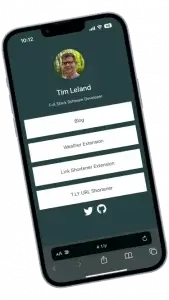
What is OneLink?
OneLink is a link-in-bio tool that makes it easy to update links and track clicks from one shareable page. You can add multiple destinations and keep everything organized in one place.
Why use OneLink?
OneLink is useful because it is simple to set up, easy to update, and flexible enough to support different social profiles or campaigns. You can also use your own custom domain to keep the page on-brand. For the setup steps, see Create and edit a OneLink.
How to use OneLink
Create an account, build your OneLink page, add the destinations you want to share, and then place the OneLink URL in your social bio. From there, visitors can choose where they want to go without needing multiple links.
If you want an easy way to keep your bio links fresh and easier to manage, OneLink is a strong option.
Related Posts



Tim Leland
Useful Tools
Ready to improve how you manage links?
T.LY URL Shortener makes long links look cleaner and easier to share! Add your own Custom Domains to personalize your brand. Create Smart Links to customize a URL's destination. Generate QR codes to promote your business.
Start your 5-day trial Browser Extension



