
How to Add Your T.LY API Key to the Link Shortener Extension
Why You Should Add Your T.LY API Key to the Extension
You get more value from the Link Shortener Extension when you connect it to your T.LY account. That gives you access to link management, analytics, and the ability to update or disable short URLs later. If you want the support version of this workflow, see the Browser extension help article.
If you are managing links from your phone, use the T.LY app for iPhone and iPad or Android too.
Link Shortener Extension Demo
How to Connect the Extension to T.LY
Here are the steps to add your T.LY API key to the Link Shortener Extension:
- Create a T.LY account.
- Go to Settings and generate an API key. If you need a broader explanation of tokens and developer access, the API basics & SDKs help article covers that.
- Enter Extension for the token name and click Create.
- Copy the token, then open the extension options by right-clicking the extension icon. You can also open
chrome-extension://oodfdmglhbbkkcngodjjagblikmoegpa/options.html.
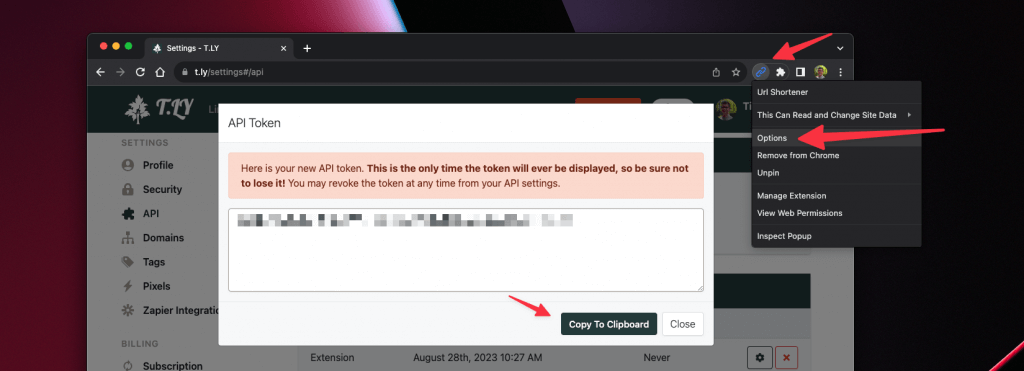
- Paste the API key into the T.LY API Token field.
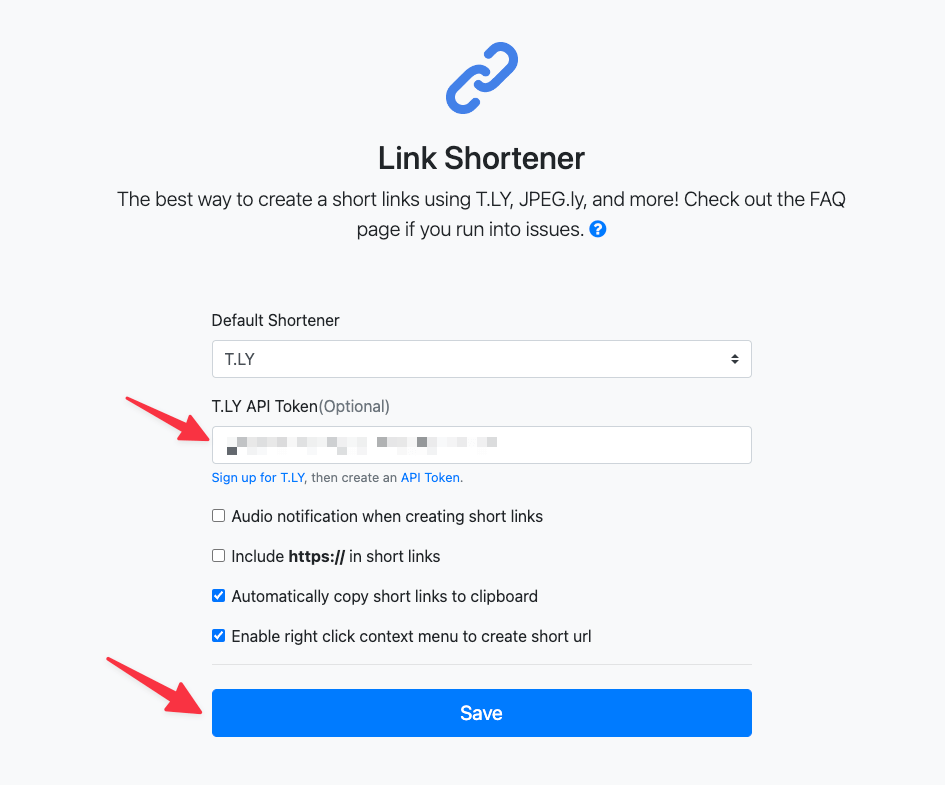
- Click Save.
Your T.LY account is now connected to the Link Shortener Extension.




Tim Leland
Useful Tools
Ready to improve how you manage links?
T.LY URL Shortener makes long links look cleaner and easier to share! Add your own Custom Domains to personalize your brand. Create Smart Links to customize a URL's destination. Generate QR codes to promote your business.
Start your 5-day trial Browser Extension



