
How to Use the URL Shortener Bookmarklet
The T.LY URL Shortener Bookmarklet is one of the fastest ways to shorten the page you are already viewing. Instead of installing a browser extension, you can save a small bookmark to your bookmarks bar and click it whenever you want to create a short link. If you want the compact support version first, start with the Bookmarklet help article.
When you use the bookmarklet, it opens T.LY with the current page URL prefilled and ready to shorten.
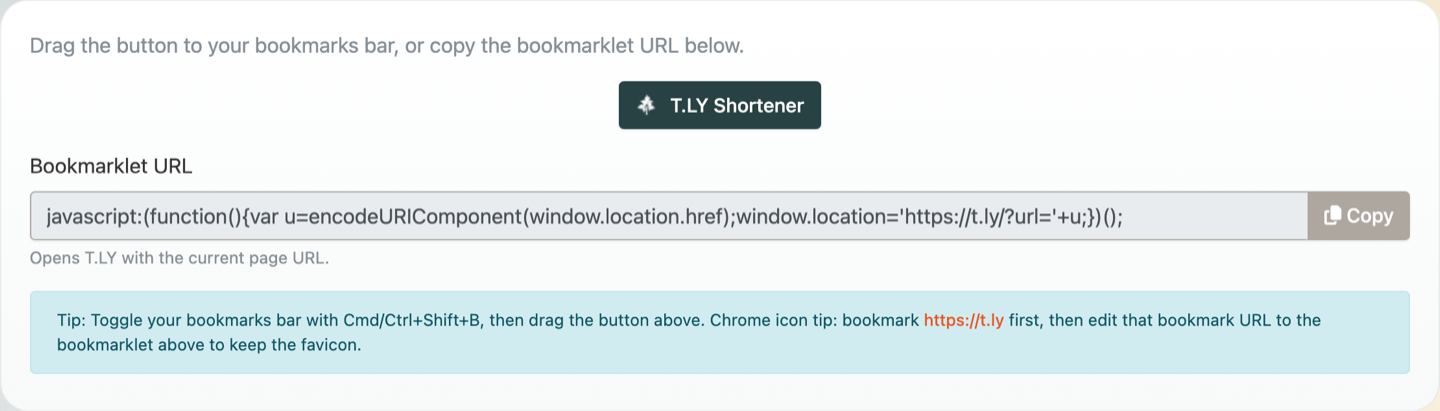
What is a bookmarklet?
A bookmarklet is a bookmark that runs a small piece of JavaScript instead of opening a normal web page. In this case, the T.LY bookmarklet grabs the URL of the page you are on and sends it to T.LY so you can shorten it quickly.
It is a good option if you want a lightweight shortcut that works without installing a full browser extension.
Why use the URL Shortener Bookmarklet?
Here are a few reasons people like bookmarklets:
- No browser extension install required
- Fast one-click access while browsing
- Useful on browsers or devices where you want a simpler setup
- Great for quickly shortening articles, product pages, docs, and social posts
If you want deeper browser integration, you may also like the T.LY URL Shortener Extension and the matching Browser extension help article. If you are working from your phone, use the T.LY app for iPhone and iPad or Android. If you want the lightest possible setup, the bookmarklet is a great choice.
How to install the URL Shortener Bookmarklet
- Open the URL Shortener Bookmarklet tool.
- Make sure your bookmarks bar is visible. In many browsers, you can toggle it with
Cmd+Shift+Bon Mac orCtrl+Shift+Bon Windows. - Drag the T.LY Shortener button from the page to your bookmarks bar.
That is it. The bookmarklet is now saved in your browser.
How to use the bookmarklet
- Visit any page you want to shorten.
- Click the T.LY Shortener bookmark in your bookmarks bar.
- T.LY will open with the current page URL already filled in.
- Click Shorten.
- Copy your new short link and share it anywhere.
This workflow is especially handy when you are researching, posting on social media, or sending links in messages and email.
What if drag-and-drop does not work?
Some browsers or bookmark bar setups can make dragging harder than expected. If that happens:
- Copy the bookmarklet URL from the bookmarklet tool page.
- Create a new bookmark in your browser.
- Paste the copied bookmarklet URL into the bookmark's URL field.
- Save it with a name like T.LY Shortener.
The tool page also includes a helpful tip: if you want to keep the T.LY favicon in Chrome, bookmark https://t.ly first and then edit that bookmark's URL to the bookmarklet code.
Bookmarklet vs. browser extension
Both options help you shorten links faster, but they fit slightly different workflows.
Tool Best for Bookmarklet A lightweight shortcut with no extension install Browser extension Faster day-to-day use with more built-in browser integration Mobile app Link checks from your phone or tablet If you already use T.LY throughout the day, the browser extension may be the better long-term setup. If you just want a quick shortcut that works from your bookmarks bar, the bookmarklet is perfect. For mobile workflows, use the T.LY app for iPhone and iPad or Android.
Final thoughts
The T.LY URL Shortener Bookmarklet is a simple way to speed up link sharing. Once it is in your bookmarks bar, you can turn almost any page into a short link in just a few clicks.
If you have not tried it yet, add it to your browser and see how much faster it makes your workflow.
Related Posts




Tim Leland
Useful Tools
Ready to improve how you manage links?
T.LY URL Shortener makes long links look cleaner and easier to share! Add your own Custom Domains to personalize your brand. Create Smart Links to customize a URL's destination. Generate QR codes to promote your business.
Start your 5-day trial Browser Extension



