How to Choose a Short Branded Domain
A short branded domain is the domain you use for your short links.
Instead of sending people through a generic short URL, you use something tied to your brand, campaign, product, or organization.
For example:
go.example.com/saleexmpl.co/demobrand.link/menutrybrand.com/free
The domain is small, but it carries a lot. It affects whether the link looks trustworthy, whether people can remember it, whether it fits on printed materials, and whether your team can use it consistently.
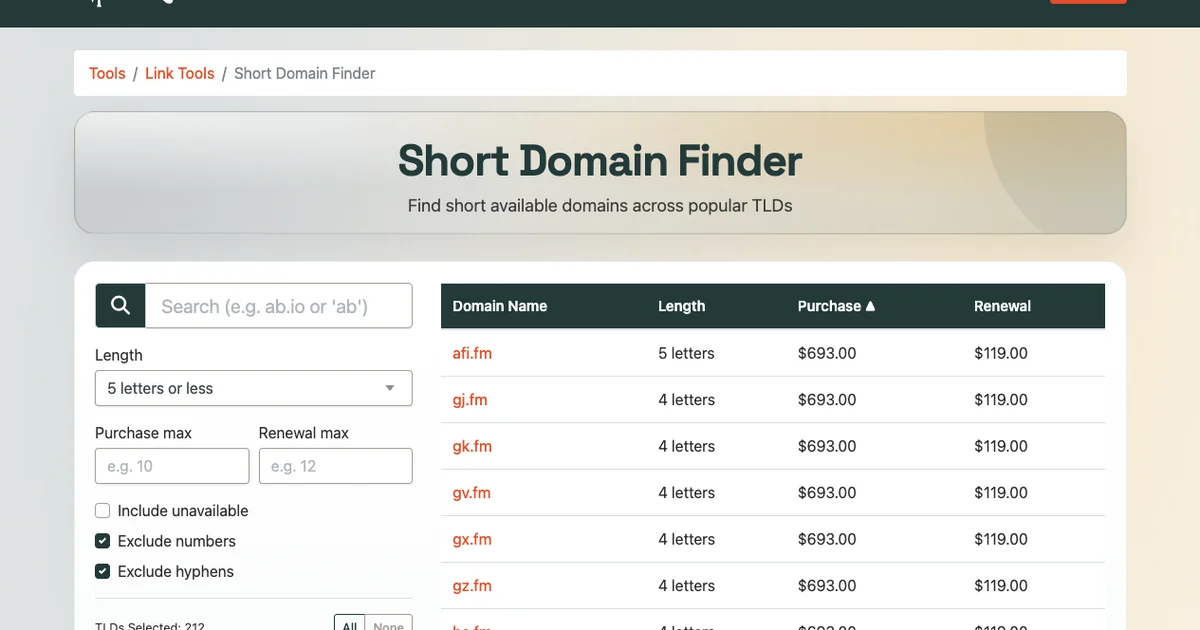
If you want to brainstorm available options, start with the T.LY Short Domain Finder. Once you have a domain, you can connect it to T.LY as a custom domain.
What makes a good short branded domain?
Short is table stakes.
A good short domain should be:
- easy to read
- easy to say out loud
- easy to type
- clearly connected to your brand
- trustworthy at a glance
- flexible enough for future campaigns
- affordable to renew
The mistake is chasing the shortest possible domain even when it looks confusing. A four-character domain nobody understands is usually worse than a seven-character domain people recognize right away.
Start with the brand, not the TLD
The best short domain usually starts with a brand shorthand.
Try:
- your brand name
- a common abbreviation
- initials people already use
- a short product name
- a campaign word
- a clear action word like
go,try,get, orvisit
For example, a company called North Coast Coffee might consider:
northcoast.concoast.codrinknc.cogo-nc.comnccoffee.co
Some options are shorter. Some are clearer. The right answer depends on where the links will be used.
For a customer-facing brand, clarity usually beats cleverness. I would rather have a link people trust than one that wins a character-count contest.
Keep it readable in the real world
Your short domain may appear in places where people do not have time to study it:
- QR codes
- flyers
- event signs
- podcast ads
- email footers
- social bios
- business cards
- packaging
- sales decks
- SMS messages
That means readability matters.
Avoid domains that are technically short but visually awkward:
- too many repeated letters
- confusing letter swaps
- numbers that look like letters
- missing vowels that make the word hard to parse
- hyphens that people forget to type
- obscure TLDs that make the whole link feel suspicious
If you have to explain the domain every time, it is probably not the right one.
Say it out loud
This is one of the best tests.
Say the domain out loud as if you were reading it in a meeting, on a podcast, or over the phone.
If you have to spell it slowly every time, that is a warning sign.
Good short domains pass the out-loud test:
- "go dot brand dot com"
- "brand dot link"
- "try brand dot co"
Weak domains often create friction:
- "the number 4, not for"
- "there is a hyphen in the middle"
- "it is missing the second vowel"
- "the TLD is spelled differently than it sounds"
That friction seems small until the link is in a podcast read, a sales call, a trade show booth, or a printed card.
Choose a trustworthy TLD
The TLD is the ending of the domain, such as .com, .co, .io, .link, or .app.
For branded short links, the TLD should feel trustworthy to your audience.
Common options include:
| TLD | When it can work |
|---|---|
.com |
Best when available and not too long |
.co |
Short, common, and startup-friendly |
.io |
Common for software and developer brands |
.link |
Directly relevant for short links |
.app |
Useful for software and app brands |
.to |
Short and common in short-link contexts |
.me |
Useful for personal brands and creators |
There are plenty of options, but do not choose a TLD only because it makes the domain shorter.
Ask:
- Will customers recognize it?
- Does it look trustworthy in an email?
- Does it make sense on printed material?
- Will it age well?
- Is the renewal price reasonable?
Some TLDs have low first-year prices and expensive renewals. Always check the renewal cost, not just the registration price.
Avoid hyphens when possible
Hyphens can make a domain harder to say, type, and remember.
For a normal website, a hyphen may be tolerable. For a short branded domain, it is usually a compromise.
Compare:
brand.link/salebr-and.link/sale
The first looks intentional. The second invites mistakes.
If a hyphen is the only way to get the domain, keep looking unless the hyphen is already part of your brand.
Be careful with numbers
Numbers can work, but they create ambiguity.
If someone hears the domain, they may not know whether to type:
4orfour2orto1orone
Numbers are less risky if they are already part of your brand. Otherwise, they often make short links harder to share verbally.
Make sure it works across campaigns
Do not choose a domain that is too narrow unless it is meant for one campaign only.
For example, spring.sale may be fun for a seasonal campaign, but it is not a flexible long-term short link domain.
For a primary branded link domain, choose something that can work for:
- product launches
- QR codes
- sales pages
- support links
- event links
- social bios
- email campaigns
- partner links
The best branded short domain becomes part of your marketing infrastructure.
Think about link examples before buying
Before registering a domain, write out a few realistic links.
For example:
go.brand.com/demogo.brand.com/menugo.brand.com/springgo.brand.com/webinargo.brand.com/supportgo.brand.com/qr
This helps you see whether the domain feels natural in use.
You are not just buying the root domain. You are buying the way every future link will look.
Check for brand confusion
Avoid domains that look too close to another company, competitor, or unrelated brand.
That matters for trust and for legal sanity.
Before choosing a domain:
- search the exact domain name
- search the brand shorthand
- check obvious social handles
- look for confusingly similar companies
- avoid names that look like typos of major brands
A branded short domain should make your links feel safer, not more questionable.
Use a subdomain when it makes sense
You do not always need to buy a separate short domain.
Many teams use a subdomain on their main domain:
go.example.comlink.example.comlinks.example.comqr.example.com
This can be a good option when your main domain is already short enough and trust matters more than saving a few characters.
A separate short domain can be better when:
- your main domain is long
- you use links in print often
- you want cleaner QR codes
- you want a dedicated campaign link identity
- you want something easier to say and type
Both approaches can work in T.LY.
Check availability and renewal price
Availability is only half the decision.
Before buying, check:
- purchase price
- annual renewal price
- transfer rules
- DNS control
- registrar reputation
- whether WHOIS privacy is included
A domain that costs $3 today but renews at $80 may not be the bargain it looks like.
The Short Domain Finder helps compare short domain options with length and price filters so you do not fall in love with an option that is annoying to renew.
Short domain checklist
Before choosing a short branded domain, ask:
- Is it easy to read?
- Is it easy to say out loud?
- Is it connected to the brand?
- Does it avoid confusing numbers and hyphens?
- Is the TLD familiar enough for the audience?
- Does it look trustworthy in email and social posts?
- Will it fit on QR codes and printed materials?
- Can it work for future campaigns?
- Is the renewal price reasonable?
- Does it avoid brand confusion?
If the domain passes those checks, it is probably a strong candidate.
How to use a short branded domain with T.LY
The workflow is pretty simple:
- Find a domain with the Short Domain Finder.
- Register it with your preferred registrar.
- Add it to T.LY as a custom domain.
- Update the DNS record.
- Create short links using your branded domain.
- Track clicks, QR scans, referrers, devices, and locations in T.LY analytics.
If you plan to use the domain for printed QR codes, pair it with a dynamic QR code so you can update the destination later without reprinting. T.LY's QR Code Management can help with that.
Final take
A short branded domain should make your links feel more trustworthy, not just shorter.
Choose something people can read, say, type, and recognize quickly. Avoid clever shortcuts that create confusion. Check renewal pricing. Write out real campaign URLs before you buy it.
Then connect it to T.LY and use it everywhere you share important links.
Start here: Short Domain Finder.



Tim Leland
Useful Tools
Ready to improve how you manage links?
T.LY URL Shortener makes long links look cleaner and easier to share! Add your own Custom Domains to personalize your brand. Create Smart Links to customize a URL's destination. Generate QR codes to promote your business.
Start your 5-day trial Browser Extension



