• Products
    Link Management OneLinks Link Tracker QR Code Management QR Scanner App URL Shortener Extension Permanent Links Short URL Expander
  • Resources
    Pricing Blog API Documentation Help Center Affiliate Program Tools
  • Articles
    Guide to URL Shorteners T.LY vs Bitly Top 5 URL Shorteners T.LY vs TinyURL Best URL Shortener API T.LY vs Rebrandly
  • Login
  • Sign Up
  • Sign Up
  1. OneLinks
  2. Review Link Hub
Review link use case

Review Link Hub

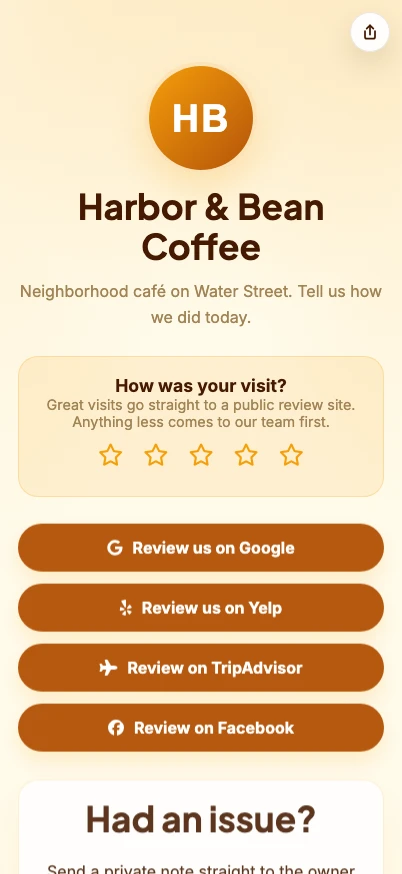
Give local customers one clean place to leave a review, pick a platform, or send private feedback. Review Link Hub uses a OneLink review request block to route happy customers toward public review sites and unhappy customers toward a private feedback form before the issue becomes public.
Build A Review Link Hub See OneLinks
Google review links Yelp + TripAdvisor Facebook + Trustpilot Private feedback form QR-ready review cards Click analytics
T.LY review link hub OneLink example screenshot.

What This OneLink Setup Solves

See how T.LY turns one short branded URL into a more useful landing page for the job at hand.

Review requests usually send everyone to the same place

A customer who had a great visit should get to Google, Yelp, TripAdvisor, Facebook, or Trustpilot fast. A frustrated customer should get a private path to your team first.

Every review platform has a different link

Put Google reviews, Yelp, TripAdvisor, Facebook, Trustpilot, and your own feedback form behind one short branded URL and QR code.

Printed review cards go stale

Keep the same QR code on receipts, table tents, front-desk cards, invoices, and packaging while updating the destinations inside T.LY.

Build it in T.LY

From idea to live OneLink

  1. Start with the Review Link Hub template and enter your business name, logo, hours, phone, website, address, and private feedback destination.
  2. Add public review destinations for Google, Yelp, TripAdvisor, Facebook, Trustpilot, or the review sites that matter most for your business.
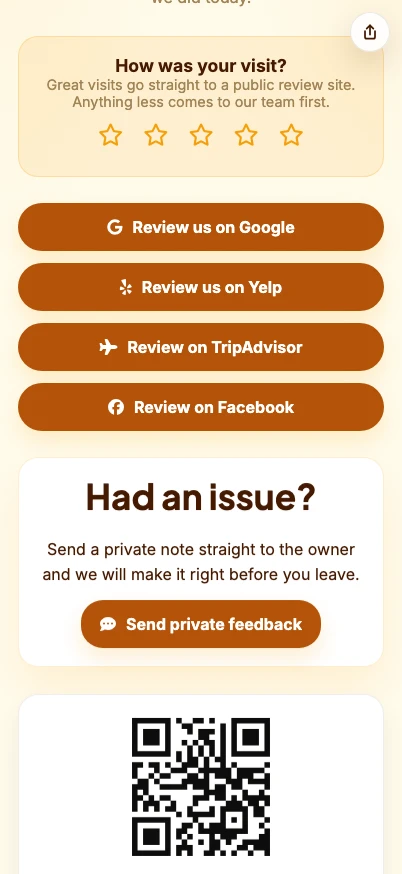
  3. Use the review request block so 4- and 5-star customers continue to a public review link while 1- to 3-star customers go to a private feedback form or email.
  4. Share the OneLink in follow-up texts, email receipts, printed cards, table tents, packaging, invoices, and QR signage.
Review Link Hub example screenshot showing review and business action blocks.
Example placements

Review Hub Examples: Receipts, Counters, and Follow-Up Texts

  • Restaurants, clinics, salons, gyms, hotels, contractors, and service businesses can give customers one QR code for Google, Yelp, TripAdvisor, Facebook, Trustpilot, and private feedback.
  • Use separate short links or QR placements for receipts, front-desk cards, thank-you emails, SMS follow-ups, and invoices when you want cleaner source reporting.
Coffee shop counter where a Review Link Hub QR code can collect reviews and private feedback.

Why T.LY Works Better

These are the platform choices that matter after the page is live and being shared across channels.

  • Route happy customers to public review pages and unhappy customers to private feedback from the same OneLink.
  • Keep every review destination editable after cards, QR codes, and receipts are already printed.
  • Use one branded short URL for Google, Yelp, TripAdvisor, Facebook, Trustpilot, and direct feedback.
  • Track page visits and review button clicks so you can see which placements and platforms work.
  • Pair the hub with QR codes for in-store, post-service, packaging, and invoice workflows.

Recommended T.LY Products

  • Review QR Code Generator
  • Google Review Link Generator
  • QR Code Image Analyzer
  • Link Tracker

Helpful Reading

  • OneLinks basics
  • Templates and styling
  • OneLinks analytics

FAQ

What is a review link hub?

It is one mobile page that gives customers review options, business info, and a private feedback path from one short URL or QR code.

Can I send happy customers to Google reviews and unhappy customers to private feedback?

Yes. The Review Link Hub template uses a review request block that can send high ratings to a public review destination and lower ratings to a private feedback URL or email.

Can I include Yelp, TripAdvisor, Facebook, and Trustpilot too?

Yes. Add each platform as a button so customers can choose the review site they already use.

Where should local businesses share a review hub?

Use it in SMS follow-ups, email receipts, printed review cards, table tents, packaging, invoices, front-desk signage, and staff follow-up messages.

Can I change review links after printing the QR code?

Yes. Update the OneLink page in T.LY and keep the same short URL and QR code live.

Explore More Use Cases

Keep going with adjacent OneLink setups that solve a similar distribution problem in a different channel.

View all use cases
T.LY local business OneLink use case preview.

OneLinks for Local Businesses

Create a local business landing page with T.LY OneLinks for hours, maps, booking, menus, offers, reviews, and QR sharing.

Local Businesses Use Case
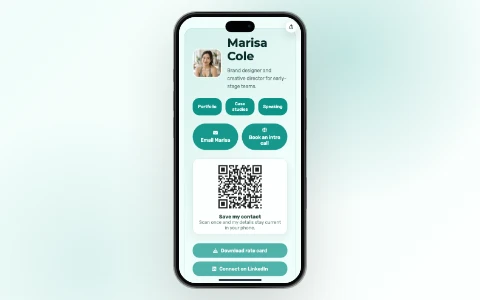
T.LY digital business card OneLink use case preview.

Digital Business Cards With OneLinks

Use T.LY OneLinks as digital business cards with QR sharing, contact actions, booking links, social profiles, and branded short URLs.

Business Cards Use Case
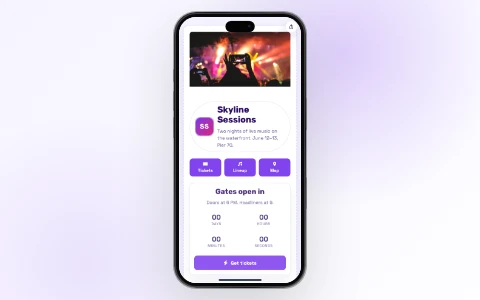
T.LY event OneLink use case preview.

OneLinks for Events

Use T.LY OneLinks for events with ticket links, countdowns, schedules, maps, FAQs, QR sharing, and mobile-friendly updates.

Events Use Case

Ready to build this in T.LY?

Launch a OneLink that stays flexible after you publish it, then keep sharing the same branded URL everywhere.

Build A Review Link Hub

Features

  • Browser Extension
  • QR Code Extension
  • Mobile App
  • URL Expander
  • Bulk URL Shortener
  • Short Domain Finder
  • QR Code Generator
  • Free URL Shortener
  • Link In Bio

Resources

  • Pricing
  • Help Center
  • API Docs
  • Blog
  • Press Kit
  • Tools
  • Report Abuse

Company

  • About
  • Affiliates
  • Careers
  • Contact
  • Privacy
  • Terms
  • Trust & Safety
© 2026 T.LY | Trusted Link Management Platform.
Browser Extension

Shorten your next link without opening T.LY

Install the free extension and turn any page into a short link in one click — it copies straight to your clipboard.

  • One-click short links from any page
  • Auto-copies to your clipboard
  • Free forever — no account needed
Add Free Extension
Loved by 450,000+ people
T.LY Link Shortener Extension preview

Works with your browser

  • Chrome Link Shortener Extension
  • Firefox Link Shortener Extension
  • Opera Link Shortener Extension
  • Edge Link Shortener Extension
  • Safari Link Shortener Extension
Loading…
